Logo Lockup System

To build equity and maintain consistency across all touchpoints, it is critical to use the correct version of the University logo. Our logo system includess specific variations based on the audience and context of the communication.

Logos and Marks

Logo Lockups & Hierarchy

Every college, school, and department plays an essential role in telling the Nevada story, which is why our Logo Lockup system is engineered to elevate your unit’s identity while firmly reinforcing our single, unified institutional brand across campus.

The Official University Standard Logo is always the primary identifier.

Companion Logos and Unit Lockups are limited, secondary identifiers that never replace the University logo.

Secondary Identifiers

Companion Logos and Unit Lockups

The logo system provides guidelines for how every unit can both support our brand while including their name in a brand compliant way.

This guidance takes effect with the new University brand. Any new materials must use the new branding. Existing stock may be used until it runs out, then must be replaced with the new brand. Evergreen materials, such as signage and vehicles must carry new branding going forward. Long-run print materials require a phase-out plan with a completion date of June 2027. Units may not create their own logos in the meantime.

 
Official Materials

Representing Your Unit in Official Materials

Use the University Standard Logo with your unit name typed out in DM Sans. This standard applies to all official University materials (e.g., printed communications, websites, email signatures, presentations, reports, building and wayfinding signage, vehicles, and more).

Prohibited Treatments
  • Do not lock the unit name up with the logo
  • Do not place the unit name inside the logo’s clear space
  • Do not place the unit name directly beside the logo
  • Do not style the unit name to resemble an official logo or custom mark
Secondary Identifiers

Companion Logos

An official logo pairing the Flagship Logo with the name of an approved school or college.

University of Nevada, Reno College of Agriculture, Biotechnology & Natural Resources Logo Lockup
Naming Convention
  • Use College of [Discipline] or School of [Discipline]
  • Use Smith College of [Discipline] or Smith School of [Discipline] for donor-named colleges or schools
  • Use an ampersand (&) instead of “and”
  • Do not use “The” before a college or school name
Access

Created by the Office of Marketing and Communications. Request Access.

Secondary Identifiers

Unit Lockup

An approved pairing of the Official University Standard Logo and a unit name typed out in DM Sans.

Mechanical Engineering Unit Lockup Identifier
Naming Convention
  • Use the unit's official name
  • Do not abbreviate
  • Do not add taglines or combine names
  • Names are limited to 3 lines on stacked and 2 lines on horizontal unit lockups.
Access

Created by the Office of Marketing and Communications. Request Access.

 
Logo Lockup

Companion Logo & Unit Lockup System Guidance

Determine which option your unit is authorized to use and review universal governance rules before creating or purchasing designed assets.

Application / Channel
Companion Logo
University of Nevada, Reno CABNR Lockup
Unit Lockup
University of Nevada, Reno Mechanical Engineering Lockup
Eligible Units
Available exclusively to approved academic Colleges and Schools.
Available to approved departments, programs, centers, institutes, interdisciplinary programs, and administrative units. Prohibited for Student Organizations & Clubs.
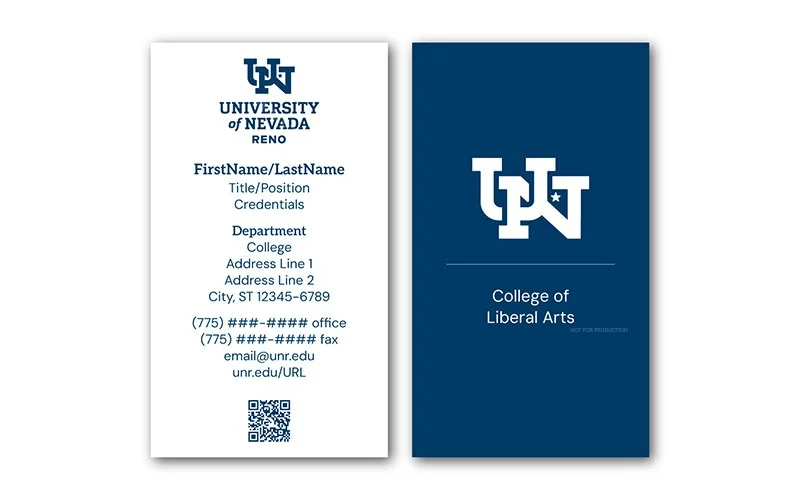
Official Stationery Letterhead, envelopes, business cards
University Standard Logo with unit name in plain text. Lockup permitted on business card backer.
Marketing Print Brochures, flyers, rack cards, postcards
University Standard Logo on front. Companion Logo permitted as secondary mark on back/interior.
University Standard Logo with unit name in plain DM Sans text. Unit lockup permitted only on promotional print swag.
Digital & Web Web headers, email signatures, slides
Prohibited. Use University Standard Logo with live/plain-text unit identification.
Promotional Items Apparel, giveaways, merchandise
Companion Logo or Unit Lockup permitted. Optional Spirit Mark allowed as secondary reference.
Unit Lockup permitted. Optional Spirit Mark allowed as secondary reference.
Fleet Vehicles
Companion Logo (horizontal only, space permitting). Requires Office of Marketing and Communications Approval
Unit Lockup permitted for identifying service fleets (e.g., Facilities Services vehicles). Requires Office of Marketing and Communications Approval

Lockup System Visual Previews

Companion Logo
University of Nevada, Reno CABNR Lockup
Unit Lockup
University of Nevada, Reno Mechanical Engineering Lockup

Eligible Units

Companion Logo

Available exclusively to approved academic Colleges and Schools.

Unit Lockup

Available to approved departments, programs, centers, institutes, interdisciplinary programs, and administrative units. Prohibited for Student Organizations & Clubs.

Official Stationery

Companion Logo

University Standard Logo with unit name in plain text. Lockup permitted on business card backer.

Unit Lockup

University Standard Logo with unit name in plain text. Lockup permitted on business card backer.

Marketing Print

Companion Logo

University Standard Logo on front. Companion Logo permitted as secondary mark on back/interior.

Unit Lockup

University Standard Logo with unit name in plain DM Sans text. Unit lockup permitted only on promotional print swag.

Digital & Web

Companion Logo

Prohibited. Use University Standard Logo with live/plain-text unit identification.

Unit Lockup

Prohibited. Use University Standard Logo with live/plain-text unit identification.

Promotional Items

Companion Logo

Companion Logo or Unit Lockup permitted. Optional Spirit Mark allowed as secondary reference.

Unit Lockup

Unit Lockup permitted. Optional Spirit Mark allowed as secondary reference.

Fleet Vehicles

Companion Logo

Companion Logo (horizontal only, space permitting). Requires Office of Marketing and Communications Approval

Unit Lockup

Unit Lockup permitted for identifying service fleets (e.g., Facilities Services vehicles). Requires Office of Marketing and Communications Approval

 
Production Guidance

Approved Lockups by Creative Asset Type

Review approved institutional lockup configurations across production formats to ensure brand alignment before ordering or producing materials.

Application Category

Print & Official Communications

Item / Specific Surface
Preferred Lockup
Alternate Lockup Option
Fallback (No Unit Name)
Mark Alone?
Letterhead, envelopes, business cards
University Standard Logo with unit name in plain text
Lockup permitted on business card backer
University Standard Logo
No
Flyers, posters, brochures, reports
University Standard Logo with unit name in plain text
Not Applicable
University Standard Logo
No
Postcards, rack cards
University Standard Logo on front
Companion Logo as secondary mark on back (Schools/Colleges only)
University Standard Logo
No

Letterhead, envelopes, business cards

Preferred Lockup

University Standard Logo with unit name in plain text

Alternate Lockup Option

Lockup permitted on business card backer

Fallback (No Unit Name)

University Standard Logo

Mark Alone?

No

Flyers, posters, brochures, reports

Preferred Lockup

University Standard Logo with unit name in plain text

Alternate Lockup Option

Not Applicable

Fallback (No Unit Name)

University Standard Logo

Mark Alone?

No

Postcards, rack cards

Preferred Lockup

University Standard Logo on front

Alternate Lockup Option

Companion Logo as secondary mark on back (Schools/Colleges only)

Fallback (No Unit Name)

University Standard Logo

Mark Alone?

No

Application Category

Digital, Web & Social Media

Item / Specific Surface
Preferred Lockup
Alternate Lockup Option
Fallback (No Unit Name)
Mark Alone?
Website headers, email signatures, slides
University Standard Logo with live/plain-text unit identification
Not Applicable
University Standard Logo
No
Social avatars, favicons, app icons
Interlocked Mark alone, with University name in profile/page title
Not Applicable
Interlocked Mark alone
Yes

Website headers, email signatures, slides

Preferred Lockup

University Standard Logo with live/plain-text unit identification

Alternate Lockup Option

Not Applicable

Fallback (No Unit Name)

University Standard Logo

Mark Alone?

No

Social avatars, favicons, app icons

Preferred Lockup

Interlocked Mark alone, with University name in profile/page title

Alternate Lockup Option

Not Applicable

Fallback (No Unit Name)

Interlocked Mark alone

Mark Alone?

Yes

Application Category

Campus Facilities & Physical Environments

Item / Specific Surface
Preferred Lockup
Alternate Lockup Option
Fallback (No Unit Name)
Mark Alone?
Building & wayfinding signage
University Standard Logo or Flagship Logo (follow Facilities standards)
Not Applicable
University Standard Logo
No
Event banners, backdrops
Standard Stacked Unit Lockup
Standard Horizontal Unit Lockup
University Standard Logo
No

Building & wayfinding signage

Preferred Lockup

University Standard Logo or Flagship Logo (follow Facilities standards)

Alternate Lockup Option

Not Applicable

Fallback (No Unit Name)

University Standard Logo

Mark Alone?

No

Event banners, backdrops

Preferred Lockup

Standard Stacked Unit Lockup

Alternate Lockup Option

Standard Horizontal Unit Lockup

Fallback (No Unit Name)

University Standard Logo

Mark Alone?

No

Application Category

Fleet & Vehicles

Item / Specific Surface
Preferred Lockup
Alternate Lockup Option
Fallback (No Unit Name)
Mark Alone?
Side panels, trailers
Standard horizontal Unit Lockup, or Companion Logo for eligible units
Standard Stacked Unit Lockup
University Standard Logo
No
Doors, small decals
Standard Stacked Unit Lockup
Interlocked Mark Unit Lockup
Stacked Wordmark
No

Side panels, trailers

Preferred Lockup

Standard horizontal Unit Lockup, or Companion Logo for eligible units

Alternate Lockup Option

Standard Stacked Unit Lockup

Fallback (No Unit Name)

University Standard Logo

Mark Alone?

No

Doors, small decals

Preferred Lockup

Standard Stacked Unit Lockup

Alternate Lockup Option

Interlocked Mark Unit Lockup

Fallback (No Unit Name)

Stacked Wordmark

Mark Alone?

No

Application Category

Promotional Items & Merchandise

Item / Specific Surface
Preferred Lockup
Alternate Lockup Option
Fallback (No Unit Name)
Mark Alone?
Apparel
Standard Stacked Unit Lockup
Interlocked Mark Unit Lockup
University Standard Logo or Stacked Wordmark
Sleeve or cap, if full name appears elsewhere on the garment
Tote bags, pennants
Standard Stacked Unit Lockup
Standard horizontal Unit Lockup
University Standard Logo
No
Table runners, tablecloths
Standard horizontal Unit Lockup
Standard Stacked Unit Lockup
University Standard Logo
No
Drinkware
Standard Stacked Unit Lockup
Interlocked Mark Unit Lockup
Stacked Wordmark
Only if the name appears elsewhere on the item
Stickers, buttons, notepads
Standard Stacked Unit Lockup
Standard horizontal Unit Lockup
University Standard Logo; one-line Wordmark
No
Pens, lanyards, USB drives
Interlocked horizontal Unit Lockup, if the unit name is legible
Not Applicable
One-line Wordmark
No
Lapel pins, other tiny items
Not Applicable
Not Applicable
One-line Wordmark
Yes, where text can’t be read

Apparel

Preferred Lockup

Standard Stacked Unit Lockup

Alternate Lockup Option

Interlocked Mark Unit Lockup

Fallback (No Unit Name)

University Standard Logo or Stacked Wordmark

Mark Alone?

Sleeve or cap, if full name appears elsewhere on the garment

Tote bags, pennants

Preferred Lockup

Standard Stacked Unit Lockup

Alternate Lockup Option

Standard horizontal Unit Lockup

Fallback (No Unit Name)

University Standard Logo

Mark Alone?

No

Table runners, tablecloths

Preferred Lockup

Standard horizontal Unit Lockup

Alternate Lockup Option

Standard Stacked Unit Lockup

Fallback (No Unit Name)

University Standard Logo

Mark Alone?

No

Drinkware

Preferred Lockup

Standard Stacked Unit Lockup

Alternate Lockup Option

Interlocked Mark Unit Lockup

Fallback (No Unit Name)

Stacked Wordmark

Mark Alone?

Only if the name appears elsewhere on the item

Stickers, buttons, notepads

Preferred Lockup

Standard Stacked Unit Lockup

Alternate Lockup Option

Standard horizontal Unit Lockup

Fallback (No Unit Name)

University Standard Logo; one-line Wordmark

Mark Alone?

No

Pens, lanyards, USB drives

Preferred Lockup

Interlocked horizontal Unit Lockup, if the unit name is legible

Alternate Lockup Option

Not Applicable

Fallback (No Unit Name)

One-line Wordmark

Mark Alone?

No

Lapel pins, other tiny items

Preferred Lockup

Not Applicable

Alternate Lockup Option

Not Applicable

Fallback (No Unit Name)

One-line Wordmark

Mark Alone?

Yes, where text can’t be read
 
Decision Framework

Choosing Your Version

Choose the version that best fits the space and production method.

Selection Hierarchy
  1. Start with the Standard Stacked Unit Lockup
  2. If the space is wide and short, use the Standard horizontal Unit Lockup.
  3. If neither can be reproduced at its minimum size, use the Interlocked Mark Lockup.
  4. If the unit name would still be illegible, drop it and use the University Standard Logo.
  5. If the University Standard Logo is too small, use the Stacked University Wordmark, then the one-line Wordmark for very small spaces on things like pens.
  6. Use the Interlocked Mark alone only where text cannot be read (e.g., lapel pins) or for digital icons.
Space Constraints

When Space Is Limited

Do not shrink any logo below its minimum size or create a custom version. The unit name may appear nearby as plain text.

Mark Alone Requirements

The University name should be visible wherever the University identity appears. The Interlocked mark may be used alone only where:

  • The University name appears elsewhere in the same context, such as a profile name, page title, or the full logo elsewhere on the item
  • The application is too small for text to be legible, such as lapel pins
  • The treatment is decorative or tone-on-tone, such as embossing or etching, and the name appears elsewhere on the piece
Governance Rule

The mark alone may never be the sole University identifier on a primary external piece.

Support & Guidance

Connect With Marketing and Communications

Have questions about brand standards, need custom design guidance, or looking to request official asset access? University Marketing and Communications is here to partner with your unit to ensure you present a strong, unified Nevada brand experience.